

In supply chain operations, the most critical data often arrives in the least organized format: the email.
Be it supplier confirmations, substitutions, partial shipments, or delivery changes, all of them land in the inbox. These messages require interpretation and judgment before systems can be updated safely. As a result, humans end up acting as middleware between inboxes and ERPs.
For our client, a large food distributor, this was a major bottleneck. Most confirmations they dealt with were structured, which made them eligible for traditional automation. But the exceptions carried substantial risk, making rule-based automation out of the question.
What's in this article:
- Why supplier emails become a bottleneck in supply chain operations
- How we automated the email-to-ERP workflow with human-in-the-loop controls
- When the AI agent auto-finalizes a record versus routes it for human review
- Which metrics help operations leaders measure system trust and performance
Suppliers send emails like:
“We’re out of 5lb bags- so shipping ten 2lb bags instead for PO #8892.”
To humans, this is a pretty straightforward message. For rule-based bots, it’s ambiguous text beyond their logic.
An Agentic Approach to Supplier Confirmations
To address the gap, we implemented an email processing agent, a controlled automation that combines automated interpretation with selective human validation.
This is how it works: The agent evaluates each supplier confirmation email, automates confirmations that are clear and complete, and routes ambiguous or partial confirmations for human review.
The agent is designed to:
- Understand Content: Differentiate between a simple "Thank you" and a critical "We are substituting SKU-101 with SKU-102."
- Assess Confidence: Calculate if the interpretation is solid enough to update the system without a human second-guessing it.
- Take Action: Automate when it is certain or escalate to a human when it is not.
Architecture Overview
The system is built on a four-layer architecture, which ensures that every email is tracked from the moment it’s received until it is finalized in the ERP.
1. Ingress and Orchestration Layer
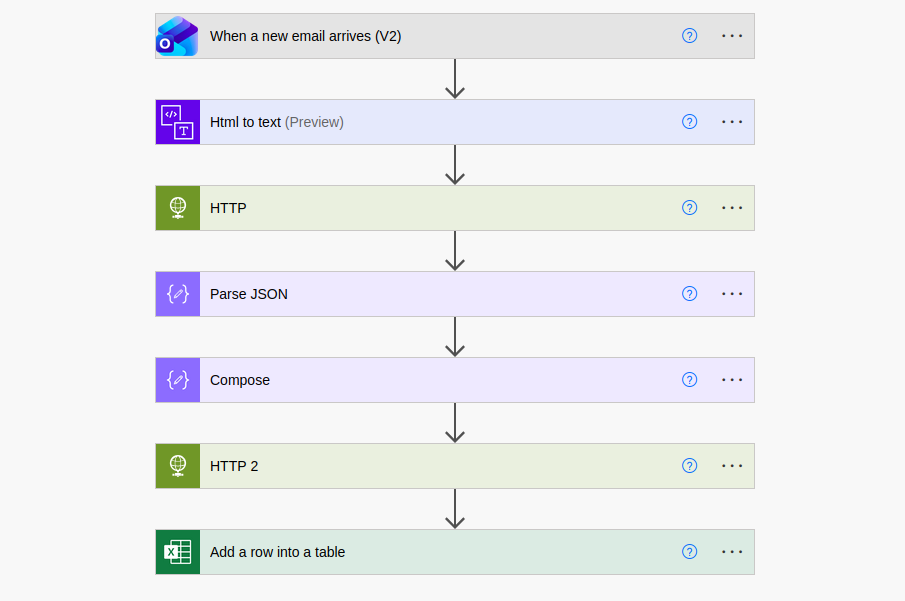
Supplier emails arrive in a shared Outlook inbox. Power Automate continuously monitors the inbox and instantiates a workflow per incoming email. For each workflow instance, it captures:
- Email body and headers
- Sender metadata
- Timestamp
- Workflow/correlation ID
At this stage, Power Automate functions purely as an orchestration and control mechanism. No business logic or interpretation is applied.
2. Intelligence and Classification Layer
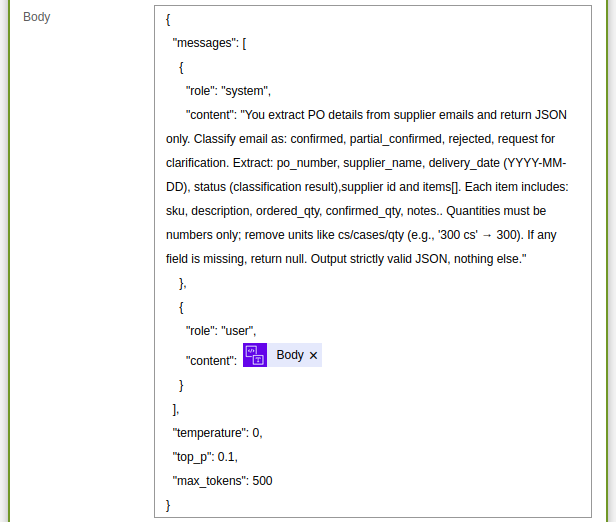
Next, the raw text is passed to an Azure OpenAI–powered agent responsible for semantic interpretation and structured extraction.
In a single reasoning step, the agent:
- Interprets supplier intent; Is the supplier saying "yes," notifying a delay, or suggesting a swap?
- Classifies the email into Confirmed, Partially Confirmed, Rejected.
- Extracts relevant business entities into a predefined JSON schema. This output represents the agent’s proposed interpretation and is not treated as the final system state.
- Assigns a confidence score to its own interpretation. This score reflects the reliability of the extracted data and is persisted alongside the structured output for downstream decisioning.
To handle the heavy lifting of interpretation, we built the agent using Azure AI Foundry. We configured it to go into action when a new email hits the inbox, so the interpretation happens in near real-time.
3. Backend API and Persistence Layer
The extracted data is sent to a backend API that acts as a gatekeeper. The API validates the data against specific business rules and schema requirements.
This layer is responsible for the decision fork. It evaluates the agent’s confidence score against pre-set thresholds to determine the next step:
- Auto-Finalized: Confirmations that meet the defined confidence threshold are finalized automatically and submitted to the ERP system without manual review.
- Review-Required: Lower-confidence or ambiguous data is flagged for human intervention.
To ensure 100% traceability, the database stores more than just the final result.
Every entry includes:
- An immutable copy of the supplier’s email
- The extracted fields, classification, and confidence score.
- Classification status (Confirmed / Partially Confirmed / Rejected)
- Confidence score
- Processing state (Auto-Finalized, Review-Required, Finalized)
- User actions and change history (where applicable)
This creates a bulletproof audit trail. If there is ever a dispute with a supplier or an inventory mismatch, operators can pull up the original message and see how it was interpreted and who approved the final record.
4. Unified Visibility with Selective Human-in-the-Loop (HITL)
To maintain trust, every processed email appears in a centralized UI regardless of classification. If the agent handles a routine confirmation perfectly, the UI simply serves as an audit log.
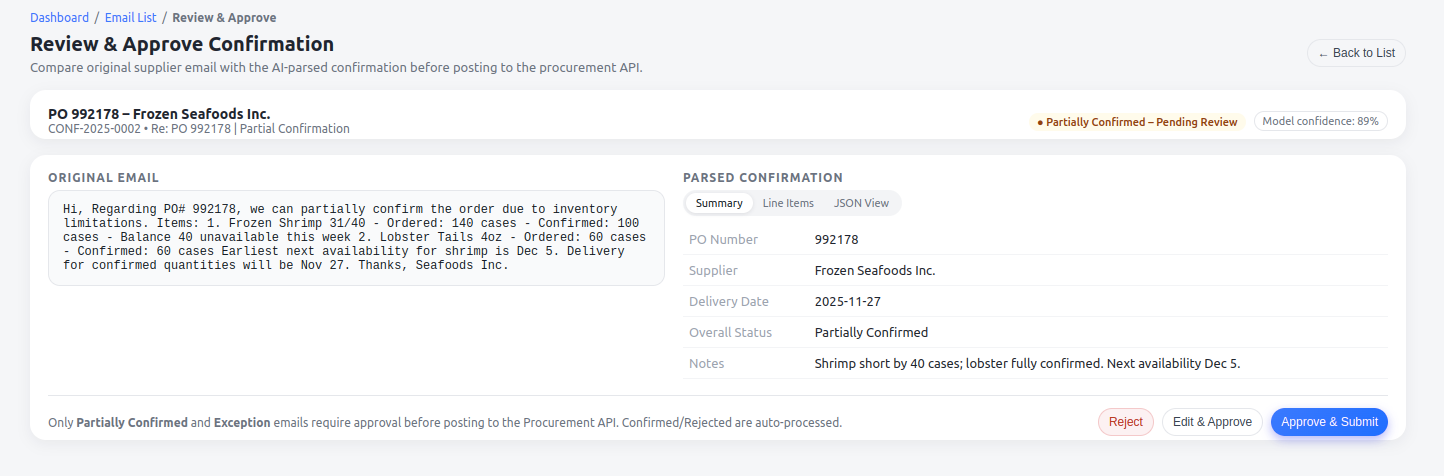
For partially confirmed records, the HITL UI provides:
- Side-by-Side Verification: The original email is displayed directly next to the agent’s parsed data. An operator can verify the accuracy of a PO number or a delivery date at a single glance.
- Quick Resolution: Operators simply Approve, Edit, or Reject the agent’s proposal. This turns a data entry chore into a quick sanity check.
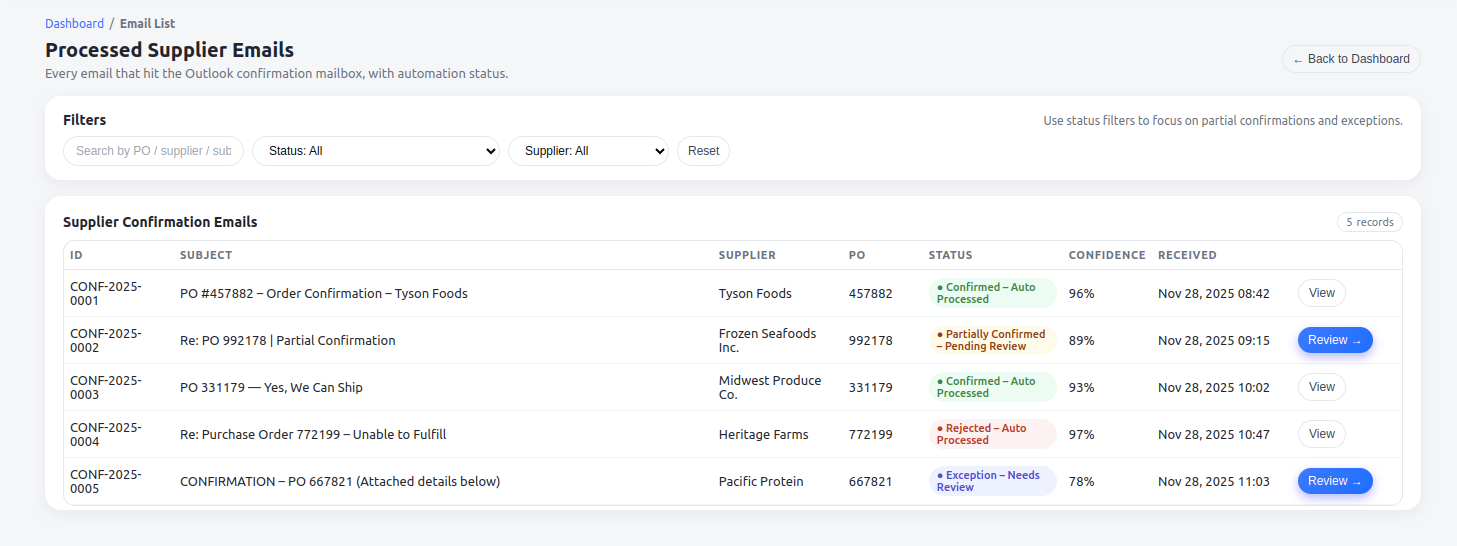
This setup ensures that no hallucinated or unverified data reaches the ERP. By logging every manual edit and approval, the system maintains a high-integrity environment.
5. Finalizing the Record
Records leave the system only when they are “Finalized,” whether that happened through high-confidence processing or human approval.
Once a partially confirmed record is human-approved:
- The updated data is saved
- The record transitions to Finalized
- The structured payload is submitted to ERP.
By the time it reaches ERP, operators know it’s been through a rigorous check. With that, the “last mile” of the process is complete.
Accountability and System Observability
In supply chains, automation cannot come at the cost of accountability. Edge cases, like a supplier offering an unusual product substitute, require careful judgment. Keeping humans in the loop ensures the agent does not make the final call on its own.
Beyond individual decisions, the system itself remains transparent. The dashboard provides key metrics such as:
- Auto-Processing Rate: A high-level view of how often the agent acts independently
- Exceptions and Escalations: A clear view of where human judgment was required
- Confidence Score Distribution: Insights into how certain the agent is across suppliers, which helps in fine-tuning the thresholds for human review
- Trend Analysis: Helping teams anticipate volume spikes or processing delays before they impact operations
This visibility allows businesses to manage their AI agent like any other department, with clear metrics and control.
The Business Impact
By closing the gap between the inbox and the ERP, the business realized four main shifts:
- Reduced Manual Effort: Teams are freed from repetitive data entry, allowing them to focus on resolving actual supply chain disruptions.
- Faster Confirmation Cycles: Confirmation cycles now happen in near real-time. Because the system eliminates "silent errors" through its own reasoning and human double-checks, the inventory and billing data in the ERP stays clean and reliable.
- Built-in Scalability: High-volume distributors often dread seasonal spikes because they mean more manual work. The system can absorb volume spikes in supplier emails without needing to hire more people.
The logic we used for supplier confirmations can be applied to almost any workflow where unstructured emails are involved.